



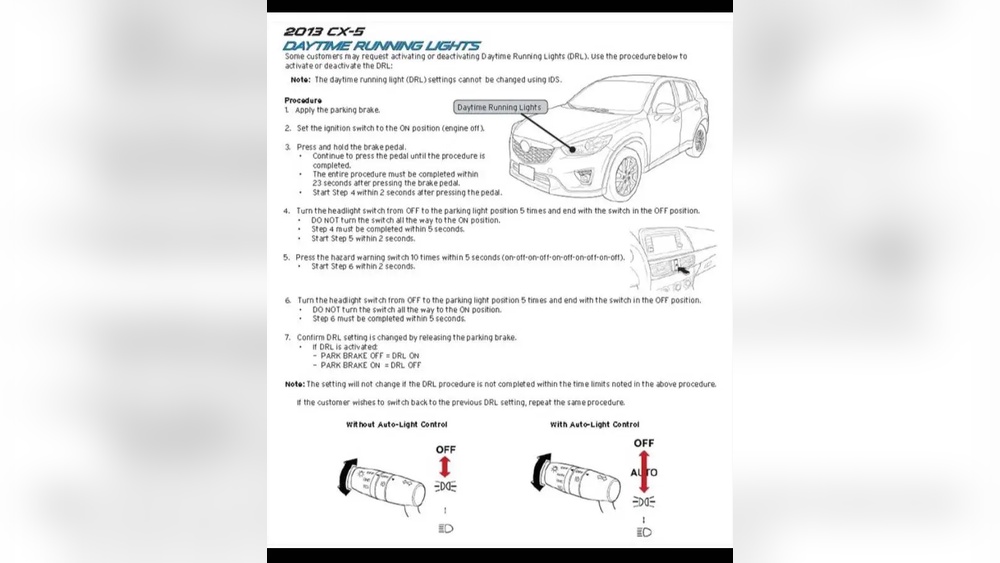
If you own a Mazda CX-5, you might have noticed the daytime running lights (DRLs) are always on. While these lights improve safety, there are times when you want to turn them off.
Maybe you’re parked for a while, or you want to save battery power. But how do you do it? You’re in the right place. This guide will show you simple steps to turn off your Mazda CX-5’s daytime running lights quickly and easily.
Keep reading to take control of your vehicle’s lighting and avoid any hassle.

Credit: www.youtube.com
Daytime Running Lights On Mazda Cx-5
The Mazda CX-5 comes with Daytime Running Lights (DRLs) that improve safety. These lights help other drivers see your vehicle during the day. They switch on automatically when you start the engine. Understanding how these lights work is useful for every driver.
Purpose Of Daytime Running Lights
Daytime Running Lights make your car more visible on the road. They reduce the risk of accidents by alerting other drivers. These lights turn on during daylight to increase safety. They use less power than regular headlights.
Default Settings On Mazda Cx-5
The Mazda CX-5 has DRLs set to turn on automatically. You cannot switch them off using the regular light controls. The system activates the lights each time the engine starts. This feature helps keep you safe without extra effort.

Credit: www.mazdausa.com
Methods To Turn Off Daytime Running Lights
Turning off the daytime running lights (DRLs) on your Mazda CX-5 can be done in a few ways. Each method offers a different approach, depending on your comfort level and vehicle model. Here are some simple ways to switch off the DRLs effectively.
Using The Headlight Control Switch
Most Mazda CX-5 models allow you to control the daytime running lights using the headlight switch. Locate the headlight control on your dashboard or steering column. Turn the switch to the “off” or “auto” position. This action may disable the DRLs and save battery power. The exact switch position can vary by model year, so check your owner’s manual for details.
Disabling Through Vehicle Settings
Some newer Mazda CX-5 models offer an option to disable DRLs through the vehicle’s settings menu. Use the infotainment screen to access the car settings. Look for lighting or safety settings in the menu. Select the option to turn off daytime running lights. This method is quick and does not require manual adjustments outside the vehicle.
Manual Fuse Removal
For a permanent solution, you can remove the fuse that powers the daytime running lights. Open the fuse box, usually found under the hood or inside the cabin. Identify the fuse linked to the DRLs using the fuse diagram. Carefully pull out the fuse to cut power to the lights. This method should be used with caution and only if you are comfortable working with vehicle electronics.
Step-by-step Guide To Disable Drls
Turning off the daytime running lights (DRLs) on a Mazda CX-5 can help save battery power and reduce light distraction. This step-by-step guide makes the process simple. Follow each step carefully to disable the DRLs safely.
Understanding how to control your vehicle’s lights improves your driving experience. The guide covers locating controls, using the settings menu, and checking the fuse box.
Locating The Headlight Control
The headlight control is usually on the left side of the steering wheel. It looks like a small dial or switch. Turn the dial to the “off” position to stop the lights from turning on automatically. Some models might have a button instead. Check your owner’s manual to find the exact location.
Accessing The Vehicle Settings Menu
Use the infotainment screen to access vehicle settings. Press the “Menu” button on the dashboard. Navigate to “Settings,” then “Lighting.” Look for the option labeled “Daytime Running Lights.” Select it and choose “Off.” This step turns off the DRLs through software control. Save your changes before exiting.
Identifying The Correct Fuse
Locate the fuse box under the hood or inside the driver’s side panel. Use the fuse diagram on the cover to find the DRL fuse. It usually has a label like “DRL” or “Lights.” Remove the fuse carefully with a fuse puller or pliers. This stops power to the DRL circuit. Keep the fuse in a safe place to reinstall later.
Safety And Legal Considerations
Turning off the daytime running lights (DRLs) on your Mazda CX-5 is simple. Before you do, consider safety and legal rules. DRLs help other drivers see your car during the day. This can reduce accidents. But rules about DRLs vary by place. Knowing these rules keeps you safe and legal on the road.
Impact On Vehicle Visibility
Daytime running lights make your car more visible. They help other drivers notice your Mazda CX-5 quickly. This is important in low light or bad weather. Turning off DRLs can reduce your visibility. Other drivers may find it harder to see your vehicle. This increases the risk of accidents. Think about safety first before switching them off.
Local Laws Regarding Drls
Many places have laws about using DRLs. Some require DRLs to be on while driving. Others allow turning them off. Check your local traffic laws before disabling DRLs. Breaking these rules can lead to fines or penalties. Your Mazda CX-5’s manual may also have advice. Follow all legal rules to avoid trouble on the road.
Troubleshooting Common Issues
Troubleshooting common issues with your Mazda CX-5’s daytime running lights (DRLs) helps keep your vehicle safe and functioning well. Some problems may stop the DRLs from turning off as expected. Others might cause warning messages to appear on your dashboard. Knowing what to check can save time and prevent stress.
Drls Not Turning Off
Sometimes, the daytime running lights stay on even after you turn off the engine. This can happen due to a faulty light switch or a problem with the vehicle’s electrical system. Check the headlight switch position first. Make sure it is not stuck or damaged. A blown fuse can also cause the DRLs to stay lit. Inspect the fuse box and replace any blown fuses carefully. If the problem continues, the DRL control module might need professional inspection.
Error Messages Or Warning Lights
Your Mazda CX-5 may show error messages or warning lights related to the DRLs. These messages alert you to electrical or bulb issues. Start by checking all the exterior lights for burned-out bulbs. Replace any that are not working. A loose or corroded connector can also trigger warnings. Inspect the wiring harness and clean any dirty contacts. Resetting the vehicle’s computer system can clear some errors. Persistent warnings require a diagnostic scan at a service center.
Alternatives To Turning Off Drls
Daytime Running Lights (DRLs) on the Mazda CX-5 improve visibility and safety. Turning them off is not always necessary. Instead, try other ways to reduce light intensity or control when lights operate. These alternatives help balance safety and comfort.
Adjusting Brightness Settings
Many Mazda CX-5 models let you adjust the brightness of the dashboard lights. Lowering brightness can reduce glare without turning off DRLs. Check the vehicle settings menu for brightness controls. Adjust the level until it feels comfortable for your eyes. This method keeps DRLs active but less bright.
Using Auto Mode
The Auto mode automatically controls headlights and DRLs. It turns lights on or off based on outside light conditions. Use this mode to avoid manual adjustments. Auto mode ensures DRLs work only when needed. This saves battery and reduces unnecessary light during the day.

Credit: www.youtube.com
Frequently Asked Questions
How Do I Disable Daytime Running Lights On Mazda Cx-5?
To turn off DRLs on a Mazda CX-5, access the vehicle’s settings menu. Navigate to the lighting options and select the daytime running lights setting. Toggle it off to disable DRLs. Some models may require manual adjustment of the headlight switch.
Are Daytime Running Lights Mandatory On Mazda Cx-5?
Daytime running lights are standard for safety and often mandatory by law. Mazda CX-5 includes DRLs to improve visibility. However, local laws may vary, so check your area’s regulations before disabling them.
Can I Manually Switch Off Mazda Cx-5 Drls?
Most Mazda CX-5 models do not allow manual DRL deactivation via the headlight switch. Instead, use the vehicle’s infotainment or settings menu to adjust DRL settings if available. Consult your owner’s manual for model-specific instructions.
Will Turning Off Drls Affect Vehicle Warranty?
Disabling daytime running lights typically does not void the Mazda CX-5 warranty. However, altering electrical components improperly might cause issues. It is best to follow manufacturer guidelines or consult a dealer before making changes.
Conclusion
Turning off the daytime running lights on your Mazda CX-5 is simple. Follow the steps carefully to avoid any issues. Adjusting these lights can help save battery and reduce distractions. Always check your vehicle’s manual for exact details. Stay safe and keep your car working well.
Now, you can control your Mazda’s lights with ease.