
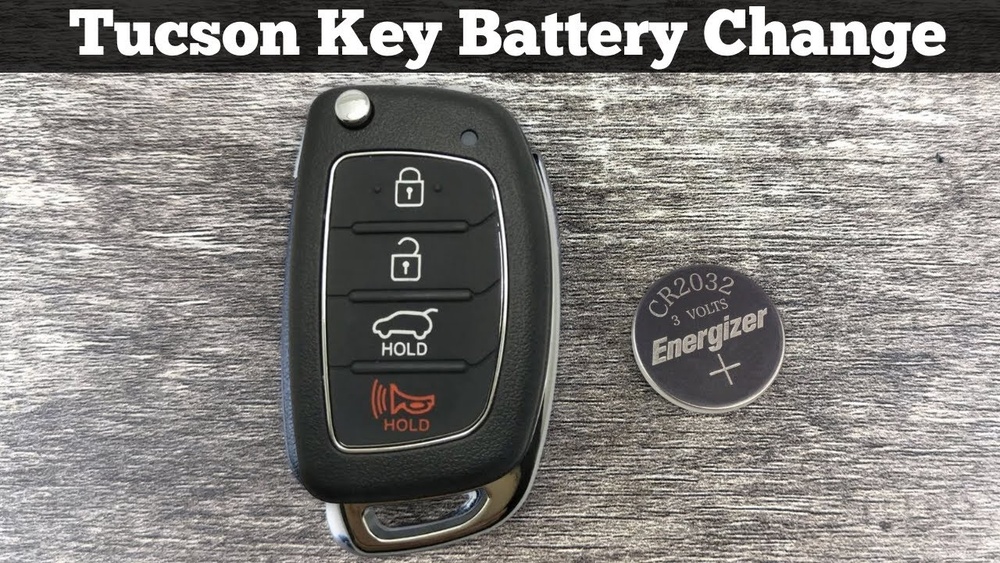
If your 2018 Hyundai Tucson key fob isn’t working like it used to, the battery might be the problem. Changing the battery yourself is easier than you think, and it can save you time and money.
In this guide, you’ll learn step-by-step how to replace your key fob battery quickly and safely. Keep reading, and you’ll have your key fob working perfectly again in no time.

Credit: www.youtube.com
Tools Needed
Changing the battery in your 2018 Hyundai Tucson key fob is simple. Having the right tools makes the task easier and faster. You do not need many items to get started.
Gathering these tools before opening the key fob saves time. Most are common household items or easy to find at a store.
Small Flathead Screwdriver
A small flathead screwdriver helps open the key fob case. It fits into the small gap and gently pries the cover apart. Use a tool that is slim and not too long.
Replacement Battery (cr2032)
The key fob uses a CR2032 battery. Check the old battery to confirm the size. Buy a fresh one to ensure your key fob works well again.
Soft Cloth Or Towel
Place the key fob on a soft cloth or towel. It prevents scratches while you work. The cloth also stops the key fob from slipping.
Small Container
Use a small container to hold tiny parts. It keeps screws and the old battery safe. This prevents losing any pieces during the change.
Locate The Key Fob Release
The first step in changing the battery of your 2018 Hyundai Tucson key fob is to locate the key fob release. This release allows you to separate the key from the fob housing. Finding it is simple and quick.
The key fob release is a small button or slider on the side of the key fob. Pressing or sliding it will release the mechanical key inside. This key is useful to open the car door manually.
Find The Small Button Or Slider
Look closely at the edges of your key fob. You will see a small button or slider on one side. This is the key fob release. Press or slide it gently.
Slide Out The Mechanical Key
After pressing the release, pull the mechanical key out. It slides out smoothly from the fob. Keep the key safe for later use.
Prepare To Open The Fob Case
With the mechanical key removed, you can now open the fob case. This step allows access to the battery compartment inside the fob. Handle the parts carefully to avoid damage.
Open The Key Fob
Opening the key fob of your 2018 Hyundai Tucson is the first step to change its battery. The process is simple and does not require special tools. You only need a small flat tool or a coin to open the fob carefully.
Start by locating the seam where the two halves of the key fob meet. This line runs along the edge of the fob. Gently insert your tool into this seam to pry the fob apart. Take your time to avoid damaging the plastic casing.
Once the fob is open, you can see the battery inside. Handle the parts with care to keep everything safe and clean. After opening, you are ready to remove the old battery and replace it with a new one.
Find The Seam On The Key Fob
Look closely at the edge of your key fob. The seam is where the two halves connect. This seam is usually a thin line around the fob. Use your fingernail or a small flat tool to feel for this line.
Use A Flat Tool Or Coin
Choose a small flathead screwdriver or a coin. Insert it gently into the seam. Twist or pry slowly to separate the two halves. Avoid using too much force to prevent cracking the plastic.
Separate The Two Halves Carefully
Once the tool has created a small opening, use your fingers to pull the halves apart. Do this slowly to avoid breaking any clips inside. The fob should open smoothly, revealing the battery compartment.
Remove The Old Battery
Start by opening the key fob carefully to access the battery. Gently lift out the old battery, making sure not to damage any parts. Removing it fully prepares the fob for the new battery installation.
Open The Key Fob Case
Start by holding the key fob firmly. Locate the small notch along the edge. Use a flat tool, like a flathead screwdriver or a coin. Gently insert it into the notch. Twist carefully to pry the case open. Avoid using too much force to prevent damage.
Take Out The Old Battery
Once the case opens, you will see the battery inside. Note the battery’s position and orientation. Use your fingers or a small tool to lift the battery out. Be careful not to bend or damage the contacts. Dispose of the old battery properly.
Clean The Battery Compartment
Check the compartment for dirt or dust. Use a dry cloth or a soft brush to clean it. Remove any debris that might block contact. Ensure the area is dry before inserting the new battery. This helps maintain a good connection.
Insert The New Battery
Inserting the new battery into your 2018 Hyundai Tucson key fob is a simple step. It restores the remote’s power and ensures smooth operation. Follow these clear instructions to place the battery correctly and avoid damage.
Prepare The New Battery
Check the battery type before starting. Use a CR2032 battery for the 2018 Tucson key fob. Remove the plastic cover from the battery. Handle the battery carefully to keep it clean and dry.
Place The Battery Correctly
Insert the battery with the positive (+) side facing up. Align the battery in the slot carefully. Do not force the battery into place. It should fit snugly without pressure.
Secure The Battery Cover
Close the key fob case by snapping the cover back on. Press around the edges to ensure it clicks. Check there are no gaps or loose parts. A tight seal keeps the battery safe and dry.
Reassemble The Key Fob
Reassembling the key fob is the final step after changing the battery. It ensures the fob works properly and fits securely in your hand. Take your time to avoid damaging any parts.
Align The Two Halves Carefully
Place the battery and circuit board inside the fob shell. Make sure the buttons line up with their slots. Hold both halves close and check that all parts are in place.
Press The Halves Together Firmly
Apply even pressure around the edges. You should hear a soft click as the parts snap together. Avoid using too much force to prevent cracks or breaks.
Test The Key Fob Buttons
Press each button to confirm they work smoothly. The lock and unlock signals should respond immediately. If a button sticks, open the fob and realign the parts.
Test The Key Fob
Testing the key fob after changing the battery is important. It confirms the new battery works well. This step ensures your Hyundai Tucson key fob controls the car properly.
Check each function on the key fob. This helps find any issues early. Testing saves time and avoids frustration later.
Check The Lock And Unlock Buttons
Press the lock button. The car doors should lock immediately. Then press the unlock button. The doors should unlock without delay. This shows the key fob sends signals correctly.
Test The Panic Button
Press the panic button once. The car horn should sound. Lights may flash at the same time. This feature helps in emergencies. Make sure it stops when you press any other button.
Try The Trunk Release Button
Press the trunk release button. The trunk should pop open. This confirms the battery powers all key fob functions. If it does not work, check the battery placement again.
Use The Key Fob Near The Car
Stand close to the car while testing. Signal strength works best nearby. If the key fob does not work from a short distance, the battery may be weak or incorrectly installed.
Replace The Battery If Needed
If any button does not respond, replace the battery again. Use the correct battery type for the 2018 Hyundai Tucson key fob. Proper battery installation is critical for full function.

Credit: www.carandtruckremotes.com
Troubleshooting Tips
Changing the battery in your 2018 Hyundai Tucson key fob is usually simple. Sometimes, problems still appear even after replacing the battery. Troubleshooting helps find and fix these issues. Use these tips to ensure your key fob works properly.
Check Battery Orientation
Make sure the new battery is placed correctly. The positive (+) side must face the right direction. Wrong placement stops the key fob from working.
Clean The Battery Contacts
Dirt or corrosion on contacts can block power flow. Use a soft cloth or a cotton swab with a little rubbing alcohol. Gently clean the contacts inside the key fob.
Verify Battery Type
Use the exact battery model recommended for your key fob. Using the wrong type may cause damage or poor performance.
Reset The Key Fob
Sometimes the key fob needs a reset after battery change. Remove the battery, wait 10 seconds, then reinsert it. This can help the fob reconnect to your car.
Check For Physical Damage
Look for cracks or broken parts in the key fob. Damage can stop it from working even with a new battery.
Test The Key Fob Buttons
Press each button firmly. Sticky or broken buttons may prevent the signal from sending.
Try A Spare Key Fob
Use a second key fob if available. If it works, the first fob may need repair or replacement.

Credit: www.carandtruckremotes.com
Frequently Asked Questions
How Do I Open The 2018 Hyundai Tucson Key Fob?
To open the key fob, locate the small slot on its side. Use a flat tool or coin to gently pry it apart. Be careful not to damage the casing during this process. This gives access to the battery compartment for replacement.
What Type Of Battery Fits The 2018 Tucson Key Fob?
The 2018 Hyundai Tucson key fob uses a CR2032 lithium coin battery. This battery is widely available in stores and online. Always check the old battery to confirm before purchasing a replacement.
How Often Should I Replace The Tucson Key Fob Battery?
Typically, the key fob battery lasts about 1 to 2 years. Replace it immediately if the remote’s range decreases or buttons stop working. Regular replacement ensures consistent key fob performance and avoids lockout situations.
Can I Change The Key Fob Battery Myself Safely?
Yes, changing the battery yourself is safe and straightforward. Use a small flat tool to open the fob and swap the battery. Handle the battery carefully and dispose of the old one properly.
Conclusion
Changing the battery in your 2018 Hyundai Tucson key fob is simple. You only need a few tools and a little time. Follow the steps carefully to avoid damage. A fresh battery keeps your key fob working well. No more worries about it not unlocking or locking your car.
Doing this yourself saves a trip to the dealer. Keep your key fob ready and reliable every day. Small tasks like this help you stay independent and save money. Try it once, and you will see how easy it is.